Draw Action: Freestyle Fight
KAYAC Inc.Action
4.31.45K Reviews
- Version
- 3.0.2
- Installs
- 50.00M
- Age Rating
- Everyone 10+
Screenshots
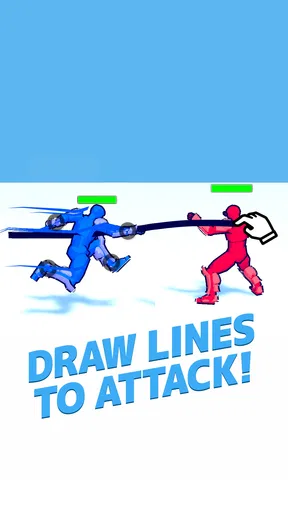
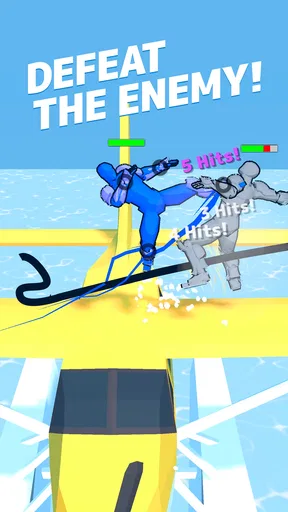
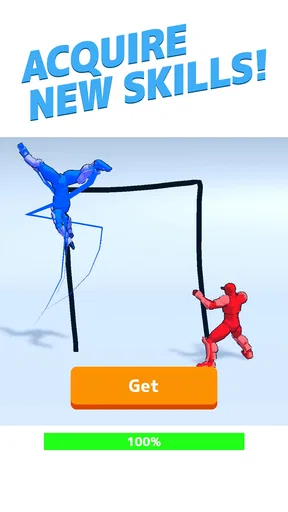
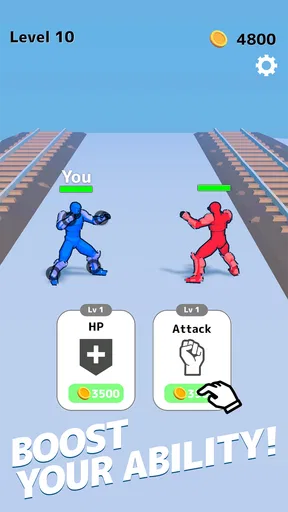
Our Review of Draw Action: Freestyle Fight
 Analysis by Appyee
I approached Draw Action: Freestyle Fight expecting a simple action game built around drawing, and that is exactly where its appeal lies. Instead of controlling a fighter through a large set of buttons, I use lines to influence the action and try to solve each encounter with a quick, readable gesture. The idea is easy to understand, but the timing and shape of a drawing can make the difference between a satisfying win and an awkward mistake.
That makes this a particularly approachable choice for short sessions. I do not need to study a complicated control scheme before playing, and I can pick it up when I have only a few spare minutes. At the same time, the drawing mechanic gives the game more personality than a standard tap-to-attack brawler. It is not a deep fighting simulator, but it has a clear identity, and that identity is what kept me interested beyond the first few attempts.
How the drawing-based fights feel in practice
The central interaction is wonderfully direct: I draw a line, then watch that idea become an action against the enemy. The pleasure comes from connecting a simple input with an immediate result. A short, deliberate stroke can feel more satisfying than repeatedly pressing an attack button because I am making a small decision rather than simply waiting for a cooldown or tapping the same control.
There is also a useful tension between speed and precision. Drawing too slowly can make the moment feel less responsive, while drawing carelessly can produce a result that does not match what I intended. I found that the best approach was to think of each gesture as a quick instruction rather than a sketch. The game rewards clarity more than artistic ability, so players who cannot draw well should not feel excluded.
That distinction matters. This is not a drawing app disguised as a fighting game, and it does not ask me to create detailed pictures. The line is a control method. Once I stopped trying to make attractive shapes and focused on making purposeful ones, the encounters became easier to read and more enjoyable.
The action category suits it well because the game depends on immediate reactions, but the pace is less demanding than a traditional action title that expects constant movement and several simultaneous buttons. I can concentrate on the next enemy and the next gesture without managing a large interface. For younger players and casual users, that simplicity is a genuine strength.
Why the control idea works for casual play
Many mobile action games imitate console controls with virtual sticks and clusters of buttons. Those systems can work, but they often feel cramped on a phone screen, especially when my thumbs cover part of the action. Draw Action takes a different route. By turning the screen into a space for gestures, it makes the phone feel more like an interactive canvas than a miniature controller.
In an everyday situation, I could play a few encounters while waiting for a bus or taking a short break. I would not choose it for a long, uninterrupted story session, but that is not a weakness in this context. Its strongest use case is the small gap in the day when I want something active and understandable without committing to a lengthy match.
The trade-off is that the same simplicity can limit the sense of mastery. Players who enjoy memorizing elaborate combinations, adjusting equipment, or building a detailed character may find the experience too narrow. The line mechanic is the star, and everything else has to support it. If that central idea does not appeal to you, there is not much reason to force yourself to continue.
Small habits that make the controls more reliable
I got better results by keeping gestures compact and intentional. Large movements may feel dramatic, but they also make it easier to lose control of the action. I recommend watching the enemy’s position first, then drawing with a clear purpose instead of reacting with a frantic scribble.
Another useful habit is to treat failed attempts as information about timing rather than as a sign that the game is unfair. When a line does not produce the result I wanted, I look at whether the problem came from the shape, the moment I drew it, or my position relative to the enemy. That small pause turns the game from random trial and error into a light form of practice.
I also found it better not to rush simply because the game looks minimal. Minimal controls do not mean that every decision is automatic. A calm gesture can be more effective than a fast one, particularly when several actions are happening close together. This is one of the less obvious strengths of the design: the game teaches restraint without presenting itself as a technical fighting challenge.
What the free version means for value
The game is free, so the basic decision is straightforward: I can try it without paying an entry price. That makes experimentation easy, especially for someone who is curious about gesture-based action but does not want to buy an unfamiliar game first. Free access also suits the short-session format because I can test whether the core mechanic fits my taste before giving it more space on my phone.
I would still separate “free to access” from “automatically valuable for everyone.” The value depends on how much I enjoy repeating a focused action loop. If I want a broad adventure, a long campaign, or a highly customizable fighter, free access does not change the fact that this may feel limited. If I want quick line-based encounters, however, the lack of an upfront price makes the experiment much easier to justify.
The game has reached over 50 million installs, with an average rating of 4.3 from around 119 thousand ratings and roughly 1.4 thousand written reviews. Those figures suggest that the concept has connected with a large mobile audience, but I would not treat popularity as a substitute for personal fit. The important question is whether drawing an attack feels more enjoyable to you than using conventional touch controls.
It is also listed for Everyone 10+, which gives families a useful starting point when deciding whether it suits a younger player. I would still pay attention to the way an individual child responds to action games, but the age label makes the intended audience clearer than a completely unrestricted rating would.
Where the game earns its keep
The strongest value comes from accessibility and immediacy. I can understand the premise quickly, begin interacting without a tutorial-heavy setup, and judge the quality of the game through its main action rather than through menus or long explanations. That is important for a free mobile title: the first few minutes should answer whether the core idea is enjoyable, and here the core idea is visible almost immediately.
There is also value in the unusual control style. Plenty of action games on Android and iOS ask me to tap, swipe, or steer in familiar ways. Drawing lines as the main action gives this one a reason to exist. It may not replace a full fighting game, but it offers a different kind of interaction for players who have grown tired of virtual buttons.
The current version is 3.0.2, and the game runs on Android 6.0 or later. That makes it relevant to people using older compatible Android devices, although the experience can still depend on the phone’s general performance and screen responsiveness. I would check the device requirement before installing, particularly if I were using an older handset.
KAYAC Inc. is the developer, and its choice to build the game around a single memorable interaction gives the title a focused feel. I appreciate that focus because it avoids pretending to be something larger than it is. The game’s value is not in offering every possible action feature; it is in making one idea immediately playable.
Limitations I noticed before recommending it
The biggest limitation is repetition. A drawing-based attack is novel at first, but novelty alone cannot carry every session. If I play for too long, the gesture itself may start to feel like a routine rather than a discovery. This is why I see the game as a strong pick-up-and-play option instead of a replacement for a deeper action game.
Another issue is the gap between intention and execution. Touchscreen drawing can be satisfying when the input is recognized as expected, but frustrating when my line feels correct and the result does not match my plan. Even a small difference in timing or placement can change the outcome. Players who prefer highly predictable button presses may find this less comfortable than a conventional control layout.
The game’s simplicity can also work against it for experienced action players. There is less room for the kind of long-term optimization found in games with extensive movesets, gear systems, or competitive rankings. I would not choose it when my main goal is to develop a complex strategy over many hours. Its challenge is concentrated in timing and gesture control, not in building a large personal playstyle.
Because it is free, I would also make my decision based on the play experience rather than assuming that no-cost access guarantees a generous long-term package. The verified price tells me there is no purchase required to start, but it does not by itself define how much content I will personally find satisfying. For that reason, the sensible approach is to try it, notice how quickly repetition sets in, and keep it only if the central mechanic remains fun.
Who will get the most from it
I would recommend this game first to casual players who want action without a complicated control scheme. It is a good match for someone who enjoys experimenting with touch gestures, likes immediate feedback, and prefers short rounds to long narrative sessions. It can also work well for a player who finds virtual joysticks uncomfortable but still wants something more active than a puzzle game.
It is especially suitable for people who enjoy learning a small system through repetition. The useful skill is not drawing beautifully; it is recognizing what kind of line is practical, when to make it, and how to stay composed when the screen becomes busy. That gives the game a modest but real learning curve, even though the first interaction is easy to understand.
Families may also appreciate the low barrier to entry. The Everyone 10+ rating places it in a broadly accessible range, and the basic concept is simple enough to explain without a long conversation about controls. I would still play alongside a younger user at first, both to see whether the action is appropriate for them and to help them understand that quick, clear gestures are more useful than random drawing.
On the other hand, I would tell fans of traditional fighting games to keep their expectations controlled. If what you want is frame-perfect combo practice, a large roster, or a detailed competitive system, a dedicated fighting game will probably serve you better. The same applies to players seeking a story-driven adventure: this title’s attraction is the act of drawing during combat, not a broad role-playing structure.
It may also be a poor fit for anyone who dislikes imprecise touch input. Some people simply prefer buttons because they know exactly what each press will do. In that case, the gesture system may feel like unnecessary friction instead of a creative improvement. I would not recommend forcing the game on yourself just because its concept sounds original; originality is useful only when it improves your own enjoyment.
How it compares with familiar mobile action games
Compared with a standard mobile brawler, this game is easier to begin but narrower in scope. A conventional brawler may give me movement controls, attack buttons, defensive options, and a larger range of tactical choices. Draw Action replaces much of that complexity with a direct line gesture. The result is less demanding in terms of interface management, but also less suitable for players who want a broad combat toolkit.
Compared with drawing or creativity apps, it is much more structured. I am not using the screen to make a finished illustration; I am drawing with an immediate action goal. That difference makes it more exciting for someone who wants a game, while a person looking for artistic freedom should choose an actual drawing tool instead.
Its closest advantage over both alternatives is the clarity of its premise. I know what I am practicing: using lines to overcome enemies. There is no need to learn a large collection of unrelated systems before the main interaction becomes meaningful. The best reason to install it is the control idea itself, not the promise of a complete action-game substitute.
For me, that makes it a useful secondary game. I can keep a deeper action title for longer sessions and return to this one when I want something lighter and more unusual. It does not need to win every comparison to be worthwhile; it only needs to offer a kind of interaction that the other game does not.
My recommendation after playing
I see Draw Action: Freestyle Fight as a focused, accessible action game with a genuinely distinctive control concept. The free price removes the main barrier to trying it, the age rating makes its intended audience clear, and the large install base shows that the idea has broad appeal. More importantly, the game gives me a reason to interact with the screen differently from the usual tap-and-button routine.
My recommendation is strongest for short sessions, casual players, gesture fans, and anyone curious about a simple combat loop that rewards timing and clear input. I would install it on a compatible Android device, test several sessions rather than judging it after one encounter, and keep it if the drawing mechanic continues to feel satisfying once the first novelty fades.
I would skip it if I need a deep fighting system, a long campaign, extensive customization, or perfectly predictable controls. Those are not minor preferences; they point toward a different kind of game. For everyone else, the low-risk entry point and focused design make it worth trying. It is not a complete replacement for traditional action games, but it is a memorable alternative when I want to draw my way through a quick fight.
Verdict
Strengths of Draw Action: Freestyle Fight
- Simple controls make it easy to start drawing attacks quickly.
- Creative combat lets you experiment with unusual fighting styles.
- Short matches work well for quick gaming sessions.
- Cartoon-style visuals are colorful and easy to follow.
- Progression gives you reasons to replay levels and improve.
Limitations of Draw Action: Freestyle Fight
- Gameplay can feel repetitive after mastering the main attack patterns.
- Some stages may rely more on timing than meaningful strategy.
- Difficulty spikes can make later fights feel frustrating.
- The game may become less engaging for players seeking deep combat.
- Ads or optional purchases may interrupt the overall experience.
Other Releases by KAYAC Inc.
View All
Ball Run 2048: merge number
Casual4.1

Number Master: Run and merge
Action4.4

Type Spin: alphabet run game
Racing4.5

Ragdoll Break: Let's destroy!
Action4.3
Similar Picks in This Category
View All
Temple Run 2: Endless Escape
Imangi Studios4.1

PUBG MOBILE
Level Infinite4.3

Free Fire: 9th Anniversary
GARENA INTERNATIONAL I4.4

Talking Tom: Hero Dash Run
Outfit7 Limited4.3

slither.io
Lowtech Studios3.9

Sniper 3D:Gun Shooting Games
Wildlife Studios4.6
Frequently Asked Questions
What is Draw Action: Freestyle Fight, and how does the gameplay work?
Draw Action: Freestyle Fight is an action game built around drawing-based combat. Instead of relying only on traditional buttons, you create gestures or draw movements on the screen to guide your character’s attacks, dodges, and special actions. Matches are generally fast-paced, with an emphasis on timing, creativity, and reacting quickly to opponents. It is easy to understand at first, although later challenges can require practice and careful movement planning.
Is Draw Action: Freestyle Fight suitable for beginners?
Yes, the game is accessible to beginners because its basic concept is simple: draw actions on the screen to make your fighter respond. The early stages usually provide a comfortable introduction to the controls and combat rhythm. However, the difficulty can increase as enemies become faster or more aggressive. New players may need several attempts to master gesture accuracy, timing, and the best way to combine offensive and defensive movements.
Does Draw Action: Freestyle Fight require an internet connection?
The game may allow some parts of the experience to be played offline, particularly individual stages or basic gameplay, but availability can depend on the version installed and the device being used. An internet connection may still be requested for advertisements, updates, optional online features, or restoring purchases. If you plan to play while traveling, it is best to open the game once online and confirm which features remain available without a connection.
Are there advertisements or in-app purchases in Draw Action: Freestyle Fight?
As with many free-to-download mobile action games, Draw Action: Freestyle Fight may include advertising and optional in-app purchases. Advertisements can appear between stages or after a defeat, while purchases may offer bonuses, remove certain limitations, or provide additional resources. You can usually enjoy the core combat without spending money, but users who prefer an uninterrupted experience should review the store listing and device purchase settings before downloading.
What devices are compatible with Draw Action: Freestyle Fight?
Compatibility depends on the operating system, device model, available storage, and the minimum requirements listed on the official Google Play or App Store page. Because drawing gestures and quick combat responses are central to the game, a touchscreen with reliable responsiveness is recommended. Older phones may run the game but could experience slower loading, reduced performance, or occasional interruptions, so checking the current store requirements is advisable before installation.
Play our best games!


